[26-Feb-2026 00:31:13 America/Chicago] PHP Warning: Use of undefined constant ABSPATH - assumed 'ABSPATH' (this will throw an Error in a future version of PHP) in /home/touchmob/crazyleafdesign.com/blog/wp-content/plugins/thrive-visual-editor/thrive-dashboard/inc/app-notification/classes/DbMigration.php on line 2 [26-Feb-2026 00:31:13 America/Chicago] PHP Warning: require_once(ABSPATHwp-admin/includes/upgrade.php): failed to open stream: No such file or directory in /home/touchmob/crazyleafdesign.com/blog/wp-content/plugins/thrive-visual-editor/thrive-dashboard/inc/app-notification/classes/DbMigration.php on line 2 [26-Feb-2026 00:31:13 America/Chicago] PHP Fatal error: require_once(): Failed opening required 'ABSPATHwp-admin/includes/upgrade.php' (include_path='.:/opt/cpanel/ea-php74/root/usr/share/pear') in /home/touchmob/crazyleafdesign.com/blog/wp-content/plugins/thrive-visual-editor/thrive-dashboard/inc/app-notification/classes/DbMigration.php on line 2 [01-Mar-2026 07:45:51 America/Chicago] PHP Warning: Use of undefined constant ABSPATH - assumed 'ABSPATH' (this will throw an Error in a future version of PHP) in /home/touchmob/crazyleafdesign.com/blog/wp-content/plugins/thrive-visual-editor/thrive-dashboard/inc/app-notification/classes/DbMigration.php on line 2 [01-Mar-2026 07:45:51 America/Chicago] PHP Warning: require_once(ABSPATHwp-admin/includes/upgrade.php): failed to open stream: No such file or directory in /home/touchmob/crazyleafdesign.com/blog/wp-content/plugins/thrive-visual-editor/thrive-dashboard/inc/app-notification/classes/DbMigration.php on line 2 [01-Mar-2026 07:45:51 America/Chicago] PHP Fatal error: require_once(): Failed opening required 'ABSPATHwp-admin/includes/upgrade.php' (include_path='.:/opt/cpanel/ea-php74/root/usr/share/pear') in /home/touchmob/crazyleafdesign.com/blog/wp-content/plugins/thrive-visual-editor/thrive-dashboard/inc/app-notification/classes/DbMigration.php on line 2 [01-Mar-2026 18:48:26 America/Chicago] PHP Warning: Use of undefined constant ABSPATH - assumed 'ABSPATH' (this will throw an Error in a future version of PHP) in /home/touchmob/crazyleafdesign.com/blog/wp-content/plugins/thrive-visual-editor/thrive-dashboard/inc/app-notification/classes/DbMigration.php on line 2 [01-Mar-2026 18:48:26 America/Chicago] PHP Warning: require_once(ABSPATHwp-admin/includes/upgrade.php): failed to open stream: No such file or directory in /home/touchmob/crazyleafdesign.com/blog/wp-content/plugins/thrive-visual-editor/thrive-dashboard/inc/app-notification/classes/DbMigration.php on line 2 [01-Mar-2026 18:48:26 America/Chicago] PHP Fatal error: require_once(): Failed opening required 'ABSPATHwp-admin/includes/upgrade.php' (include_path='.:/opt/cpanel/ea-php74/root/usr/share/pear') in /home/touchmob/crazyleafdesign.com/blog/wp-content/plugins/thrive-visual-editor/thrive-dashboard/inc/app-notification/classes/DbMigration.php on line 2 [06-Mar-2026 13:14:53 America/Chicago] PHP Warning: Use of undefined constant ABSPATH - assumed 'ABSPATH' (this will throw an Error in a future version of PHP) in /home/touchmob/crazyleafdesign.com/blog/wp-content/plugins/thrive-visual-editor/thrive-dashboard/inc/app-notification/classes/DbMigration.php on line 2 [06-Mar-2026 13:14:53 America/Chicago] PHP Warning: require_once(ABSPATHwp-admin/includes/upgrade.php): failed to open stream: No such file or directory in /home/touchmob/crazyleafdesign.com/blog/wp-content/plugins/thrive-visual-editor/thrive-dashboard/inc/app-notification/classes/DbMigration.php on line 2 [06-Mar-2026 13:14:53 America/Chicago] PHP Fatal error: require_once(): Failed opening required 'ABSPATHwp-admin/includes/upgrade.php' (include_path='.:/opt/cpanel/ea-php74/root/usr/share/pear') in /home/touchmob/crazyleafdesign.com/blog/wp-content/plugins/thrive-visual-editor/thrive-dashboard/inc/app-notification/classes/DbMigration.php on line 2 [08-Mar-2026 11:47:41 America/Chicago] PHP Warning: Use of undefined constant ABSPATH - assumed 'ABSPATH' (this will throw an Error in a future version of PHP) in /home/touchmob/crazyleafdesign.com/blog/wp-content/plugins/thrive-visual-editor/thrive-dashboard/inc/app-notification/classes/DbMigration.php on line 2 [08-Mar-2026 11:47:41 America/Chicago] PHP Warning: require_once(ABSPATHwp-admin/includes/upgrade.php): failed to open stream: No such file or directory in /home/touchmob/crazyleafdesign.com/blog/wp-content/plugins/thrive-visual-editor/thrive-dashboard/inc/app-notification/classes/DbMigration.php on line 2 [08-Mar-2026 11:47:41 America/Chicago] PHP Fatal error: require_once(): Failed opening required 'ABSPATHwp-admin/includes/upgrade.php' (include_path='.:/opt/cpanel/ea-php74/root/usr/share/pear') in /home/touchmob/crazyleafdesign.com/blog/wp-content/plugins/thrive-visual-editor/thrive-dashboard/inc/app-notification/classes/DbMigration.php on line 2 [20-Mar-2026 17:37:48 America/Chicago] PHP Warning: Use of undefined constant ABSPATH - assumed 'ABSPATH' (this will throw an Error in a future version of PHP) in /home/touchmob/crazyleafdesign.com/blog/wp-content/plugins/thrive-visual-editor/thrive-dashboard/inc/app-notification/classes/DbMigration.php on line 2 [20-Mar-2026 17:37:48 America/Chicago] PHP Warning: require_once(ABSPATHwp-admin/includes/upgrade.php): failed to open stream: No such file or directory in /home/touchmob/crazyleafdesign.com/blog/wp-content/plugins/thrive-visual-editor/thrive-dashboard/inc/app-notification/classes/DbMigration.php on line 2 [20-Mar-2026 17:37:48 America/Chicago] PHP Fatal error: require_once(): Failed opening required 'ABSPATHwp-admin/includes/upgrade.php' (include_path='.:/opt/cpanel/ea-php74/root/usr/share/pear') in /home/touchmob/crazyleafdesign.com/blog/wp-content/plugins/thrive-visual-editor/thrive-dashboard/inc/app-notification/classes/DbMigration.php on line 2 [20-Mar-2026 17:37:53 America/Chicago] PHP Warning: Use of undefined constant ABSPATH - assumed 'ABSPATH' (this will throw an Error in a future version of PHP) in /home/touchmob/crazyleafdesign.com/blog/wp-content/plugins/thrive-visual-editor/thrive-dashboard/inc/app-notification/classes/DbMigration.php on line 2 [20-Mar-2026 17:37:53 America/Chicago] PHP Warning: require_once(ABSPATHwp-admin/includes/upgrade.php): failed to open stream: No such file or directory in /home/touchmob/crazyleafdesign.com/blog/wp-content/plugins/thrive-visual-editor/thrive-dashboard/inc/app-notification/classes/DbMigration.php on line 2 [20-Mar-2026 17:37:53 America/Chicago] PHP Fatal error: require_once(): Failed opening required 'ABSPATHwp-admin/includes/upgrade.php' (include_path='.:/opt/cpanel/ea-php74/root/usr/share/pear') in /home/touchmob/crazyleafdesign.com/blog/wp-content/plugins/thrive-visual-editor/thrive-dashboard/inc/app-notification/classes/DbMigration.php on line 2 [27-Mar-2026 14:07:52 America/Chicago] PHP Warning: Use of undefined constant ABSPATH - assumed 'ABSPATH' (this will throw an Error in a future version of PHP) in /home/touchmob/crazyleafdesign.com/blog/wp-content/plugins/thrive-visual-editor/thrive-dashboard/inc/app-notification/classes/DbMigration.php on line 2 [27-Mar-2026 14:07:52 America/Chicago] PHP Warning: require_once(ABSPATHwp-admin/includes/upgrade.php): failed to open stream: No such file or directory in /home/touchmob/crazyleafdesign.com/blog/wp-content/plugins/thrive-visual-editor/thrive-dashboard/inc/app-notification/classes/DbMigration.php on line 2 [27-Mar-2026 14:07:52 America/Chicago] PHP Fatal error: require_once(): Failed opening required 'ABSPATHwp-admin/includes/upgrade.php' (include_path='.:/opt/cpanel/ea-php74/root/usr/share/pear') in /home/touchmob/crazyleafdesign.com/blog/wp-content/plugins/thrive-visual-editor/thrive-dashboard/inc/app-notification/classes/DbMigration.php on line 2 [29-Mar-2026 10:21:48 America/Chicago] PHP Warning: Use of undefined constant ABSPATH - assumed 'ABSPATH' (this will throw an Error in a future version of PHP) in /home/touchmob/crazyleafdesign.com/blog/wp-content/plugins/thrive-visual-editor/thrive-dashboard/inc/app-notification/classes/DbMigration.php on line 2 [29-Mar-2026 10:21:48 America/Chicago] PHP Warning: require_once(ABSPATHwp-admin/includes/upgrade.php): failed to open stream: No such file or directory in /home/touchmob/crazyleafdesign.com/blog/wp-content/plugins/thrive-visual-editor/thrive-dashboard/inc/app-notification/classes/DbMigration.php on line 2 [29-Mar-2026 10:21:48 America/Chicago] PHP Fatal error: require_once(): Failed opening required 'ABSPATHwp-admin/includes/upgrade.php' (include_path='.:/opt/cpanel/ea-php74/root/usr/share/pear') in /home/touchmob/crazyleafdesign.com/blog/wp-content/plugins/thrive-visual-editor/thrive-dashboard/inc/app-notification/classes/DbMigration.php on line 2 Windows Media Player 11 Button - How did they do it
Menu
in ,

Windows Media Player 11 Button – How did they do it

To begin this tutorial, I simply created a few rectangles with different shades of blue.


Now select the “Elipse Tool” and draw a circle as I have done below with 121212 as your foreground color. Hold in the shift key to draw a perfect circle.

Now that you have your circle, you can now right click on the layer in the Layers Palette and select, “Blending Options…“. Now click on “Stroke“. Use the settings below :

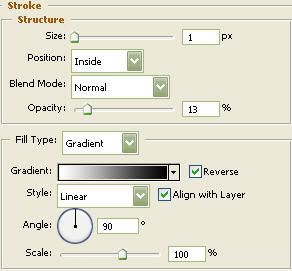
You should now have the following :

Select the “Elipse Tool” again and draw another circle this time using 0023a4 as your foreground color. Hold in the shift key to draw a perfect circle.

Select the “Elipse Tool” again and draw yet another circle this time using White as your foreground color. This circle need not be perfect.
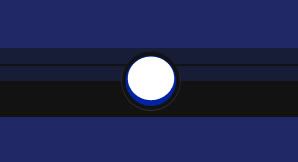
Next we will need to move the bottom anchor point. To do this, select the “Direct Selection Tool” and select the anchor point on the bottom. Now, using the up arrow key on your keyboard, move that anchor point as I have done below. Then turn the “Fill” down to 28%.
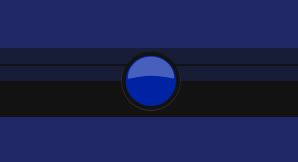
Note : The direct selection tool is :

Now “Ctrl” click the blue circle layer to create a selection around it and grab the “Brush Tool” with the diameter at 50% and the hardness at 17%. Create a new layer, change the blending mode to “Color Dodge” and change the color to 70e2ff. Now click only once toward the bottom of the selection as I have illustrated below. Deselect and go to next step.
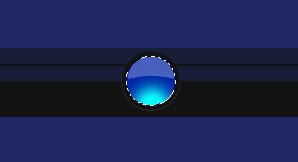
Select the “Rounded Rectangle Tool” set at 100 pixels, with the color d4d9e0, and draw the shape illustrated below.

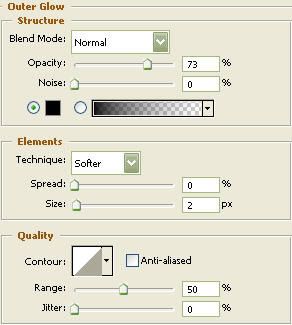
Now that you have your shape, you can now right click on the layer in the Layers Palette and select, “Blending Options…“. Now click on “Outer Glow“. Use the settings below :

The results. I then duplicated the gray shape and moved to the appropriate space. I hope you enjoyed this tutorial.

Tutorial by Empire Design.

Written by CrazyLeaf Editorial

Follow us on Twitter @crazyleaf , Facebook , Pinterest

Leave a Reply

Exit mobile version