
[26-Feb-2026 00:31:13 America/Chicago] PHP Warning: Use of undefined constant ABSPATH - assumed 'ABSPATH' (this will throw an Error in a future version of PHP) in /home/touchmob/crazyleafdesign.com/blog/wp-content/plugins/thrive-visual-editor/thrive-dashboard/inc/app-notification/classes/DbMigration.php on line 2 [26-Feb-2026 00:31:13 America/Chicago] PHP Warning: require_once(ABSPATHwp-admin/includes/upgrade.php): failed to open stream: No such file or directory in /home/touchmob/crazyleafdesign.com/blog/wp-content/plugins/thrive-visual-editor/thrive-dashboard/inc/app-notification/classes/DbMigration.php on line 2 [26-Feb-2026 00:31:13 America/Chicago] PHP Fatal error: require_once(): Failed opening required 'ABSPATHwp-admin/includes/upgrade.php' (include_path='.:/opt/cpanel/ea-php74/root/usr/share/pear') in /home/touchmob/crazyleafdesign.com/blog/wp-content/plugins/thrive-visual-editor/thrive-dashboard/inc/app-notification/classes/DbMigration.php on line 2 [01-Mar-2026 07:45:51 America/Chicago] PHP Warning: Use of undefined constant ABSPATH - assumed 'ABSPATH' (this will throw an Error in a future version of PHP) in /home/touchmob/crazyleafdesign.com/blog/wp-content/plugins/thrive-visual-editor/thrive-dashboard/inc/app-notification/classes/DbMigration.php on line 2 [01-Mar-2026 07:45:51 America/Chicago] PHP Warning: require_once(ABSPATHwp-admin/includes/upgrade.php): failed to open stream: No such file or directory in /home/touchmob/crazyleafdesign.com/blog/wp-content/plugins/thrive-visual-editor/thrive-dashboard/inc/app-notification/classes/DbMigration.php on line 2 [01-Mar-2026 07:45:51 America/Chicago] PHP Fatal error: require_once(): Failed opening required 'ABSPATHwp-admin/includes/upgrade.php' (include_path='.:/opt/cpanel/ea-php74/root/usr/share/pear') in /home/touchmob/crazyleafdesign.com/blog/wp-content/plugins/thrive-visual-editor/thrive-dashboard/inc/app-notification/classes/DbMigration.php on line 2 [01-Mar-2026 18:48:26 America/Chicago] PHP Warning: Use of undefined constant ABSPATH - assumed 'ABSPATH' (this will throw an Error in a future version of PHP) in /home/touchmob/crazyleafdesign.com/blog/wp-content/plugins/thrive-visual-editor/thrive-dashboard/inc/app-notification/classes/DbMigration.php on line 2 [01-Mar-2026 18:48:26 America/Chicago] PHP Warning: require_once(ABSPATHwp-admin/includes/upgrade.php): failed to open stream: No such file or directory in /home/touchmob/crazyleafdesign.com/blog/wp-content/plugins/thrive-visual-editor/thrive-dashboard/inc/app-notification/classes/DbMigration.php on line 2 [01-Mar-2026 18:48:26 America/Chicago] PHP Fatal error: require_once(): Failed opening required 'ABSPATHwp-admin/includes/upgrade.php' (include_path='.:/opt/cpanel/ea-php74/root/usr/share/pear') in /home/touchmob/crazyleafdesign.com/blog/wp-content/plugins/thrive-visual-editor/thrive-dashboard/inc/app-notification/classes/DbMigration.php on line 2 [06-Mar-2026 13:14:53 America/Chicago] PHP Warning: Use of undefined constant ABSPATH - assumed 'ABSPATH' (this will throw an Error in a future version of PHP) in /home/touchmob/crazyleafdesign.com/blog/wp-content/plugins/thrive-visual-editor/thrive-dashboard/inc/app-notification/classes/DbMigration.php on line 2 [06-Mar-2026 13:14:53 America/Chicago] PHP Warning: require_once(ABSPATHwp-admin/includes/upgrade.php): failed to open stream: No such file or directory in /home/touchmob/crazyleafdesign.com/blog/wp-content/plugins/thrive-visual-editor/thrive-dashboard/inc/app-notification/classes/DbMigration.php on line 2 [06-Mar-2026 13:14:53 America/Chicago] PHP Fatal error: require_once(): Failed opening required 'ABSPATHwp-admin/includes/upgrade.php' (include_path='.:/opt/cpanel/ea-php74/root/usr/share/pear') in /home/touchmob/crazyleafdesign.com/blog/wp-content/plugins/thrive-visual-editor/thrive-dashboard/inc/app-notification/classes/DbMigration.php on line 2 [08-Mar-2026 11:47:41 America/Chicago] PHP Warning: Use of undefined constant ABSPATH - assumed 'ABSPATH' (this will throw an Error in a future version of PHP) in /home/touchmob/crazyleafdesign.com/blog/wp-content/plugins/thrive-visual-editor/thrive-dashboard/inc/app-notification/classes/DbMigration.php on line 2 [08-Mar-2026 11:47:41 America/Chicago] PHP Warning: require_once(ABSPATHwp-admin/includes/upgrade.php): failed to open stream: No such file or directory in /home/touchmob/crazyleafdesign.com/blog/wp-content/plugins/thrive-visual-editor/thrive-dashboard/inc/app-notification/classes/DbMigration.php on line 2 [08-Mar-2026 11:47:41 America/Chicago] PHP Fatal error: require_once(): Failed opening required 'ABSPATHwp-admin/includes/upgrade.php' (include_path='.:/opt/cpanel/ea-php74/root/usr/share/pear') in /home/touchmob/crazyleafdesign.com/blog/wp-content/plugins/thrive-visual-editor/thrive-dashboard/inc/app-notification/classes/DbMigration.php on line 2 [20-Mar-2026 17:37:48 America/Chicago] PHP Warning: Use of undefined constant ABSPATH - assumed 'ABSPATH' (this will throw an Error in a future version of PHP) in /home/touchmob/crazyleafdesign.com/blog/wp-content/plugins/thrive-visual-editor/thrive-dashboard/inc/app-notification/classes/DbMigration.php on line 2 [20-Mar-2026 17:37:48 America/Chicago] PHP Warning: require_once(ABSPATHwp-admin/includes/upgrade.php): failed to open stream: No such file or directory in /home/touchmob/crazyleafdesign.com/blog/wp-content/plugins/thrive-visual-editor/thrive-dashboard/inc/app-notification/classes/DbMigration.php on line 2 [20-Mar-2026 17:37:48 America/Chicago] PHP Fatal error: require_once(): Failed opening required 'ABSPATHwp-admin/includes/upgrade.php' (include_path='.:/opt/cpanel/ea-php74/root/usr/share/pear') in /home/touchmob/crazyleafdesign.com/blog/wp-content/plugins/thrive-visual-editor/thrive-dashboard/inc/app-notification/classes/DbMigration.php on line 2 [20-Mar-2026 17:37:53 America/Chicago] PHP Warning: Use of undefined constant ABSPATH - assumed 'ABSPATH' (this will throw an Error in a future version of PHP) in /home/touchmob/crazyleafdesign.com/blog/wp-content/plugins/thrive-visual-editor/thrive-dashboard/inc/app-notification/classes/DbMigration.php on line 2 [20-Mar-2026 17:37:53 America/Chicago] PHP Warning: require_once(ABSPATHwp-admin/includes/upgrade.php): failed to open stream: No such file or directory in /home/touchmob/crazyleafdesign.com/blog/wp-content/plugins/thrive-visual-editor/thrive-dashboard/inc/app-notification/classes/DbMigration.php on line 2 [20-Mar-2026 17:37:53 America/Chicago] PHP Fatal error: require_once(): Failed opening required 'ABSPATHwp-admin/includes/upgrade.php' (include_path='.:/opt/cpanel/ea-php74/root/usr/share/pear') in /home/touchmob/crazyleafdesign.com/blog/wp-content/plugins/thrive-visual-editor/thrive-dashboard/inc/app-notification/classes/DbMigration.php on line 2 [27-Mar-2026 14:07:52 America/Chicago] PHP Warning: Use of undefined constant ABSPATH - assumed 'ABSPATH' (this will throw an Error in a future version of PHP) in /home/touchmob/crazyleafdesign.com/blog/wp-content/plugins/thrive-visual-editor/thrive-dashboard/inc/app-notification/classes/DbMigration.php on line 2 [27-Mar-2026 14:07:52 America/Chicago] PHP Warning: require_once(ABSPATHwp-admin/includes/upgrade.php): failed to open stream: No such file or directory in /home/touchmob/crazyleafdesign.com/blog/wp-content/plugins/thrive-visual-editor/thrive-dashboard/inc/app-notification/classes/DbMigration.php on line 2 [27-Mar-2026 14:07:52 America/Chicago] PHP Fatal error: require_once(): Failed opening required 'ABSPATHwp-admin/includes/upgrade.php' (include_path='.:/opt/cpanel/ea-php74/root/usr/share/pear') in /home/touchmob/crazyleafdesign.com/blog/wp-content/plugins/thrive-visual-editor/thrive-dashboard/inc/app-notification/classes/DbMigration.php on line 2 [29-Mar-2026 10:21:48 America/Chicago] PHP Warning: Use of undefined constant ABSPATH - assumed 'ABSPATH' (this will throw an Error in a future version of PHP) in /home/touchmob/crazyleafdesign.com/blog/wp-content/plugins/thrive-visual-editor/thrive-dashboard/inc/app-notification/classes/DbMigration.php on line 2 [29-Mar-2026 10:21:48 America/Chicago] PHP Warning: require_once(ABSPATHwp-admin/includes/upgrade.php): failed to open stream: No such file or directory in /home/touchmob/crazyleafdesign.com/blog/wp-content/plugins/thrive-visual-editor/thrive-dashboard/inc/app-notification/classes/DbMigration.php on line 2 [29-Mar-2026 10:21:48 America/Chicago] PHP Fatal error: require_once(): Failed opening required 'ABSPATHwp-admin/includes/upgrade.php' (include_path='.:/opt/cpanel/ea-php74/root/usr/share/pear') in /home/touchmob/crazyleafdesign.com/blog/wp-content/plugins/thrive-visual-editor/thrive-dashboard/inc/app-notification/classes/DbMigration.php on line 2 PrimePress - Free Premium WordPress Theme
Menu
in

PrimePress – Free Premium WordPress Theme

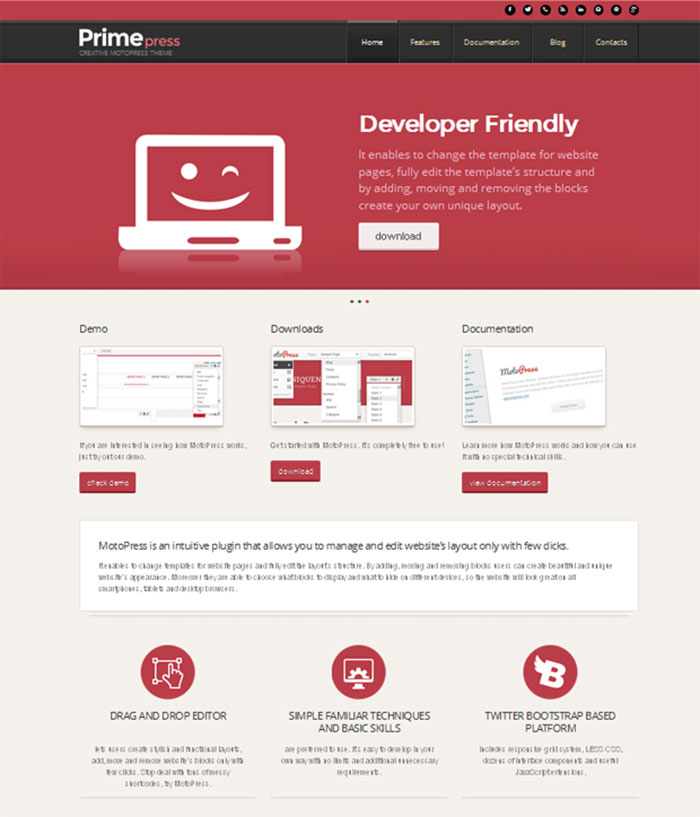
MotoPress developers prepared a really useful present for all WordPress users. They have already released a free PrimePress theme which can be a good place to start your own online business. If you need the template to create a quality website, this is something you probably do not want to miss.

Features

PrimePress theme is bootstrap based and offers much opportunities to modify your website. It goes with several layout options so will fit to any screen resolution and look perfect on all computer devices.

Responsive WordPress theme by MotoPress has loads of handy features that make site management a breeze. Its good interface helps to save a lot of time and increase your productivity.

Build-in drag and drop layout editor allows you add, move and remove website’s blocks. It makes possible to customize any template page with its power and assemble the design of a page by dragging and dropping its key elements. Just think how handy it is, you have the complete control over your website with no coding skills required.

The gold of PrimePress is the opportunity to download it for free. You don’t need to pay to use it for your needs, vice-versa you can try all its advantages absolutely for nothing. Just read carefully the documentation to get started!

Download and demo

Click here to download PrimePress or check out the PrimePress live demo.

How to install

If you are eager to begin right now, here is a brief manual how to install the PrimePress theme. Perform the steps and get an effective responsive website in a few minutes.
  1. Extract the archive to your computer.
  2. Extract the archive CherryFramework.zip to themes folder of your WordPress website wp-content/themes/CherryFramework.
  3. Extract the archive primepress.zip to the themes folder of your WordPress website wp-content/themes/primepress.
  4. Login to WordPress.
  5. Go to Appearance -> Themes section where you will find the uploaded theme PrimePress.
  6. Click Activate link and activate the PrimePress theme.
  7. Install plugins for this theme. Press Begin installing plugins and select all plugins, choose Install action then press Apply.
  8. If you install the theme to the existing website and do not need to add a sample data just preview your theme and launch the MotoPress plugin
  9. If you want to add the sample data, you can find instructions of how to import it at the theme_installation folder \primepress_sample_theme\theme_installation\template_instructions.html in the downloaded theme.

Done? Don’t hesitate, go ahead and start your online presence with PrimePress right now!

Written by CrazyLeaf Editorial

Follow us on Twitter @crazyleaf , Facebook , Pinterest

Leave a Reply

Exit mobile version