[26-Feb-2026 00:31:13 America/Chicago] PHP Warning: Use of undefined constant ABSPATH - assumed 'ABSPATH' (this will throw an Error in a future version of PHP) in /home/touchmob/crazyleafdesign.com/blog/wp-content/plugins/thrive-visual-editor/thrive-dashboard/inc/app-notification/classes/DbMigration.php on line 2 [26-Feb-2026 00:31:13 America/Chicago] PHP Warning: require_once(ABSPATHwp-admin/includes/upgrade.php): failed to open stream: No such file or directory in /home/touchmob/crazyleafdesign.com/blog/wp-content/plugins/thrive-visual-editor/thrive-dashboard/inc/app-notification/classes/DbMigration.php on line 2 [26-Feb-2026 00:31:13 America/Chicago] PHP Fatal error: require_once(): Failed opening required 'ABSPATHwp-admin/includes/upgrade.php' (include_path='.:/opt/cpanel/ea-php74/root/usr/share/pear') in /home/touchmob/crazyleafdesign.com/blog/wp-content/plugins/thrive-visual-editor/thrive-dashboard/inc/app-notification/classes/DbMigration.php on line 2 [01-Mar-2026 07:45:51 America/Chicago] PHP Warning: Use of undefined constant ABSPATH - assumed 'ABSPATH' (this will throw an Error in a future version of PHP) in /home/touchmob/crazyleafdesign.com/blog/wp-content/plugins/thrive-visual-editor/thrive-dashboard/inc/app-notification/classes/DbMigration.php on line 2 [01-Mar-2026 07:45:51 America/Chicago] PHP Warning: require_once(ABSPATHwp-admin/includes/upgrade.php): failed to open stream: No such file or directory in /home/touchmob/crazyleafdesign.com/blog/wp-content/plugins/thrive-visual-editor/thrive-dashboard/inc/app-notification/classes/DbMigration.php on line 2 [01-Mar-2026 07:45:51 America/Chicago] PHP Fatal error: require_once(): Failed opening required 'ABSPATHwp-admin/includes/upgrade.php' (include_path='.:/opt/cpanel/ea-php74/root/usr/share/pear') in /home/touchmob/crazyleafdesign.com/blog/wp-content/plugins/thrive-visual-editor/thrive-dashboard/inc/app-notification/classes/DbMigration.php on line 2 [01-Mar-2026 18:48:26 America/Chicago] PHP Warning: Use of undefined constant ABSPATH - assumed 'ABSPATH' (this will throw an Error in a future version of PHP) in /home/touchmob/crazyleafdesign.com/blog/wp-content/plugins/thrive-visual-editor/thrive-dashboard/inc/app-notification/classes/DbMigration.php on line 2 [01-Mar-2026 18:48:26 America/Chicago] PHP Warning: require_once(ABSPATHwp-admin/includes/upgrade.php): failed to open stream: No such file or directory in /home/touchmob/crazyleafdesign.com/blog/wp-content/plugins/thrive-visual-editor/thrive-dashboard/inc/app-notification/classes/DbMigration.php on line 2 [01-Mar-2026 18:48:26 America/Chicago] PHP Fatal error: require_once(): Failed opening required 'ABSPATHwp-admin/includes/upgrade.php' (include_path='.:/opt/cpanel/ea-php74/root/usr/share/pear') in /home/touchmob/crazyleafdesign.com/blog/wp-content/plugins/thrive-visual-editor/thrive-dashboard/inc/app-notification/classes/DbMigration.php on line 2 [06-Mar-2026 13:14:53 America/Chicago] PHP Warning: Use of undefined constant ABSPATH - assumed 'ABSPATH' (this will throw an Error in a future version of PHP) in /home/touchmob/crazyleafdesign.com/blog/wp-content/plugins/thrive-visual-editor/thrive-dashboard/inc/app-notification/classes/DbMigration.php on line 2 [06-Mar-2026 13:14:53 America/Chicago] PHP Warning: require_once(ABSPATHwp-admin/includes/upgrade.php): failed to open stream: No such file or directory in /home/touchmob/crazyleafdesign.com/blog/wp-content/plugins/thrive-visual-editor/thrive-dashboard/inc/app-notification/classes/DbMigration.php on line 2 [06-Mar-2026 13:14:53 America/Chicago] PHP Fatal error: require_once(): Failed opening required 'ABSPATHwp-admin/includes/upgrade.php' (include_path='.:/opt/cpanel/ea-php74/root/usr/share/pear') in /home/touchmob/crazyleafdesign.com/blog/wp-content/plugins/thrive-visual-editor/thrive-dashboard/inc/app-notification/classes/DbMigration.php on line 2 [08-Mar-2026 11:47:41 America/Chicago] PHP Warning: Use of undefined constant ABSPATH - assumed 'ABSPATH' (this will throw an Error in a future version of PHP) in /home/touchmob/crazyleafdesign.com/blog/wp-content/plugins/thrive-visual-editor/thrive-dashboard/inc/app-notification/classes/DbMigration.php on line 2 [08-Mar-2026 11:47:41 America/Chicago] PHP Warning: require_once(ABSPATHwp-admin/includes/upgrade.php): failed to open stream: No such file or directory in /home/touchmob/crazyleafdesign.com/blog/wp-content/plugins/thrive-visual-editor/thrive-dashboard/inc/app-notification/classes/DbMigration.php on line 2 [08-Mar-2026 11:47:41 America/Chicago] PHP Fatal error: require_once(): Failed opening required 'ABSPATHwp-admin/includes/upgrade.php' (include_path='.:/opt/cpanel/ea-php74/root/usr/share/pear') in /home/touchmob/crazyleafdesign.com/blog/wp-content/plugins/thrive-visual-editor/thrive-dashboard/inc/app-notification/classes/DbMigration.php on line 2 [20-Mar-2026 17:37:48 America/Chicago] PHP Warning: Use of undefined constant ABSPATH - assumed 'ABSPATH' (this will throw an Error in a future version of PHP) in /home/touchmob/crazyleafdesign.com/blog/wp-content/plugins/thrive-visual-editor/thrive-dashboard/inc/app-notification/classes/DbMigration.php on line 2 [20-Mar-2026 17:37:48 America/Chicago] PHP Warning: require_once(ABSPATHwp-admin/includes/upgrade.php): failed to open stream: No such file or directory in /home/touchmob/crazyleafdesign.com/blog/wp-content/plugins/thrive-visual-editor/thrive-dashboard/inc/app-notification/classes/DbMigration.php on line 2 [20-Mar-2026 17:37:48 America/Chicago] PHP Fatal error: require_once(): Failed opening required 'ABSPATHwp-admin/includes/upgrade.php' (include_path='.:/opt/cpanel/ea-php74/root/usr/share/pear') in /home/touchmob/crazyleafdesign.com/blog/wp-content/plugins/thrive-visual-editor/thrive-dashboard/inc/app-notification/classes/DbMigration.php on line 2 [20-Mar-2026 17:37:53 America/Chicago] PHP Warning: Use of undefined constant ABSPATH - assumed 'ABSPATH' (this will throw an Error in a future version of PHP) in /home/touchmob/crazyleafdesign.com/blog/wp-content/plugins/thrive-visual-editor/thrive-dashboard/inc/app-notification/classes/DbMigration.php on line 2 [20-Mar-2026 17:37:53 America/Chicago] PHP Warning: require_once(ABSPATHwp-admin/includes/upgrade.php): failed to open stream: No such file or directory in /home/touchmob/crazyleafdesign.com/blog/wp-content/plugins/thrive-visual-editor/thrive-dashboard/inc/app-notification/classes/DbMigration.php on line 2 [20-Mar-2026 17:37:53 America/Chicago] PHP Fatal error: require_once(): Failed opening required 'ABSPATHwp-admin/includes/upgrade.php' (include_path='.:/opt/cpanel/ea-php74/root/usr/share/pear') in /home/touchmob/crazyleafdesign.com/blog/wp-content/plugins/thrive-visual-editor/thrive-dashboard/inc/app-notification/classes/DbMigration.php on line 2 [27-Mar-2026 14:07:52 America/Chicago] PHP Warning: Use of undefined constant ABSPATH - assumed 'ABSPATH' (this will throw an Error in a future version of PHP) in /home/touchmob/crazyleafdesign.com/blog/wp-content/plugins/thrive-visual-editor/thrive-dashboard/inc/app-notification/classes/DbMigration.php on line 2 [27-Mar-2026 14:07:52 America/Chicago] PHP Warning: require_once(ABSPATHwp-admin/includes/upgrade.php): failed to open stream: No such file or directory in /home/touchmob/crazyleafdesign.com/blog/wp-content/plugins/thrive-visual-editor/thrive-dashboard/inc/app-notification/classes/DbMigration.php on line 2 [27-Mar-2026 14:07:52 America/Chicago] PHP Fatal error: require_once(): Failed opening required 'ABSPATHwp-admin/includes/upgrade.php' (include_path='.:/opt/cpanel/ea-php74/root/usr/share/pear') in /home/touchmob/crazyleafdesign.com/blog/wp-content/plugins/thrive-visual-editor/thrive-dashboard/inc/app-notification/classes/DbMigration.php on line 2 [29-Mar-2026 10:21:48 America/Chicago] PHP Warning: Use of undefined constant ABSPATH - assumed 'ABSPATH' (this will throw an Error in a future version of PHP) in /home/touchmob/crazyleafdesign.com/blog/wp-content/plugins/thrive-visual-editor/thrive-dashboard/inc/app-notification/classes/DbMigration.php on line 2 [29-Mar-2026 10:21:48 America/Chicago] PHP Warning: require_once(ABSPATHwp-admin/includes/upgrade.php): failed to open stream: No such file or directory in /home/touchmob/crazyleafdesign.com/blog/wp-content/plugins/thrive-visual-editor/thrive-dashboard/inc/app-notification/classes/DbMigration.php on line 2 [29-Mar-2026 10:21:48 America/Chicago] PHP Fatal error: require_once(): Failed opening required 'ABSPATHwp-admin/includes/upgrade.php' (include_path='.:/opt/cpanel/ea-php74/root/usr/share/pear') in /home/touchmob/crazyleafdesign.com/blog/wp-content/plugins/thrive-visual-editor/thrive-dashboard/inc/app-notification/classes/DbMigration.php on line 2 Making a Web 2.0 Logo in Photoshop
Menu
in , ,

Making a web 2.0 logo in Photoshop

This Photoshop tutorial will explain how to make a web 2.0 glossy logo or icon if you like. I tried to keep it as simple as possible. If you have any questions post them in the comments below.

I am starting with a 400×300 px white canvas. Draw your basic shape. I have started with a custom shape from Photoshop‘s presets.

Step 1

Fill the shape with a nice orange color (I am using #ff6600)

Step 2

Apply Bevel and Emboss to the layer using the following values :

Structure

  • Style : Inner Bevel
  • Technique : Smooth
  • Depth : 100%
  • Direction : Up
  • Size : 200px
  • Soften : 0px

Shading

  • Angle : 120 (use global light checked)
  • Altitude : 30
  • Highlight mode : Screen, Opacity : 75%
  • Shadow mode : Multiply (color : #ff0000), opacity 75%.

Step 3

Stoke the layer with an orange color 3 pixels in size (I am using the same orange as the fill : #ff6600)

Step 4

Apply an inner glow, size 40px.

Step 5

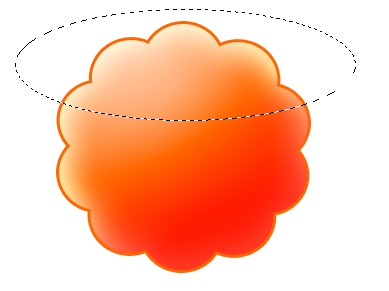
Create a new top layer and using the Elliptical Marquee Tool create an oval over the top of the original shape layer. Fill this layer with gradient from white to transparent (white at the bottom, transparent at the top). Give this layer a 50% opacity. You may rotate this layer so it will look cooler.
Step 6

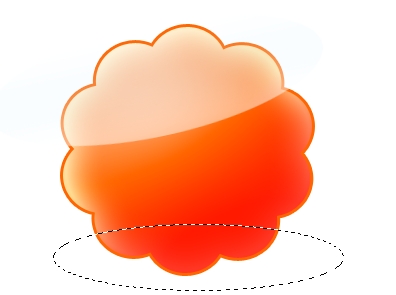
Make another top layer and using the Elliptical Marquee Tool create an oval over the bottom of the original shape layer. Fill this layer with gradient from black to transparent (black at the top, transparent at the bottom). Give this layer a 80% opacity and a soft light or a hard mix blend.
Step 7

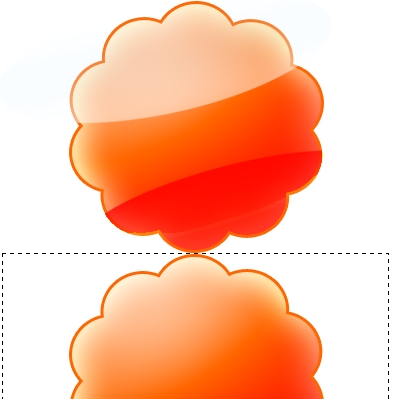
Now to create a nice mirror effect we’ll move all the layers to the top of the canvas and duplicate the original shape layer. Flip Vertical the clone of the shape layer and align it so it touches the bottom of the original shape layer.

Step 8

Add a new layer and using the Rectangular marquee tool make a selection starting at the bottom of the original shape layer like in the image below. Apply to this layer a gradient from white at the bottom to transparent at the top.
Step 9

Add some nice text using a good typeface and you’re set.

Download the PSD file

Written by CrazyLeaf Editorial

Follow us on Twitter @crazyleaf , Facebook , Pinterest

Leave a Reply

Exit mobile version