[26-Feb-2026 00:31:13 America/Chicago] PHP Warning: Use of undefined constant ABSPATH - assumed 'ABSPATH' (this will throw an Error in a future version of PHP) in /home/touchmob/crazyleafdesign.com/blog/wp-content/plugins/thrive-visual-editor/thrive-dashboard/inc/app-notification/classes/DbMigration.php on line 2 [26-Feb-2026 00:31:13 America/Chicago] PHP Warning: require_once(ABSPATHwp-admin/includes/upgrade.php): failed to open stream: No such file or directory in /home/touchmob/crazyleafdesign.com/blog/wp-content/plugins/thrive-visual-editor/thrive-dashboard/inc/app-notification/classes/DbMigration.php on line 2 [26-Feb-2026 00:31:13 America/Chicago] PHP Fatal error: require_once(): Failed opening required 'ABSPATHwp-admin/includes/upgrade.php' (include_path='.:/opt/cpanel/ea-php74/root/usr/share/pear') in /home/touchmob/crazyleafdesign.com/blog/wp-content/plugins/thrive-visual-editor/thrive-dashboard/inc/app-notification/classes/DbMigration.php on line 2 [01-Mar-2026 07:45:51 America/Chicago] PHP Warning: Use of undefined constant ABSPATH - assumed 'ABSPATH' (this will throw an Error in a future version of PHP) in /home/touchmob/crazyleafdesign.com/blog/wp-content/plugins/thrive-visual-editor/thrive-dashboard/inc/app-notification/classes/DbMigration.php on line 2 [01-Mar-2026 07:45:51 America/Chicago] PHP Warning: require_once(ABSPATHwp-admin/includes/upgrade.php): failed to open stream: No such file or directory in /home/touchmob/crazyleafdesign.com/blog/wp-content/plugins/thrive-visual-editor/thrive-dashboard/inc/app-notification/classes/DbMigration.php on line 2 [01-Mar-2026 07:45:51 America/Chicago] PHP Fatal error: require_once(): Failed opening required 'ABSPATHwp-admin/includes/upgrade.php' (include_path='.:/opt/cpanel/ea-php74/root/usr/share/pear') in /home/touchmob/crazyleafdesign.com/blog/wp-content/plugins/thrive-visual-editor/thrive-dashboard/inc/app-notification/classes/DbMigration.php on line 2 [01-Mar-2026 18:48:26 America/Chicago] PHP Warning: Use of undefined constant ABSPATH - assumed 'ABSPATH' (this will throw an Error in a future version of PHP) in /home/touchmob/crazyleafdesign.com/blog/wp-content/plugins/thrive-visual-editor/thrive-dashboard/inc/app-notification/classes/DbMigration.php on line 2 [01-Mar-2026 18:48:26 America/Chicago] PHP Warning: require_once(ABSPATHwp-admin/includes/upgrade.php): failed to open stream: No such file or directory in /home/touchmob/crazyleafdesign.com/blog/wp-content/plugins/thrive-visual-editor/thrive-dashboard/inc/app-notification/classes/DbMigration.php on line 2 [01-Mar-2026 18:48:26 America/Chicago] PHP Fatal error: require_once(): Failed opening required 'ABSPATHwp-admin/includes/upgrade.php' (include_path='.:/opt/cpanel/ea-php74/root/usr/share/pear') in /home/touchmob/crazyleafdesign.com/blog/wp-content/plugins/thrive-visual-editor/thrive-dashboard/inc/app-notification/classes/DbMigration.php on line 2 [06-Mar-2026 13:14:53 America/Chicago] PHP Warning: Use of undefined constant ABSPATH - assumed 'ABSPATH' (this will throw an Error in a future version of PHP) in /home/touchmob/crazyleafdesign.com/blog/wp-content/plugins/thrive-visual-editor/thrive-dashboard/inc/app-notification/classes/DbMigration.php on line 2 [06-Mar-2026 13:14:53 America/Chicago] PHP Warning: require_once(ABSPATHwp-admin/includes/upgrade.php): failed to open stream: No such file or directory in /home/touchmob/crazyleafdesign.com/blog/wp-content/plugins/thrive-visual-editor/thrive-dashboard/inc/app-notification/classes/DbMigration.php on line 2 [06-Mar-2026 13:14:53 America/Chicago] PHP Fatal error: require_once(): Failed opening required 'ABSPATHwp-admin/includes/upgrade.php' (include_path='.:/opt/cpanel/ea-php74/root/usr/share/pear') in /home/touchmob/crazyleafdesign.com/blog/wp-content/plugins/thrive-visual-editor/thrive-dashboard/inc/app-notification/classes/DbMigration.php on line 2 [08-Mar-2026 11:47:41 America/Chicago] PHP Warning: Use of undefined constant ABSPATH - assumed 'ABSPATH' (this will throw an Error in a future version of PHP) in /home/touchmob/crazyleafdesign.com/blog/wp-content/plugins/thrive-visual-editor/thrive-dashboard/inc/app-notification/classes/DbMigration.php on line 2 [08-Mar-2026 11:47:41 America/Chicago] PHP Warning: require_once(ABSPATHwp-admin/includes/upgrade.php): failed to open stream: No such file or directory in /home/touchmob/crazyleafdesign.com/blog/wp-content/plugins/thrive-visual-editor/thrive-dashboard/inc/app-notification/classes/DbMigration.php on line 2 [08-Mar-2026 11:47:41 America/Chicago] PHP Fatal error: require_once(): Failed opening required 'ABSPATHwp-admin/includes/upgrade.php' (include_path='.:/opt/cpanel/ea-php74/root/usr/share/pear') in /home/touchmob/crazyleafdesign.com/blog/wp-content/plugins/thrive-visual-editor/thrive-dashboard/inc/app-notification/classes/DbMigration.php on line 2 [20-Mar-2026 17:37:48 America/Chicago] PHP Warning: Use of undefined constant ABSPATH - assumed 'ABSPATH' (this will throw an Error in a future version of PHP) in /home/touchmob/crazyleafdesign.com/blog/wp-content/plugins/thrive-visual-editor/thrive-dashboard/inc/app-notification/classes/DbMigration.php on line 2 [20-Mar-2026 17:37:48 America/Chicago] PHP Warning: require_once(ABSPATHwp-admin/includes/upgrade.php): failed to open stream: No such file or directory in /home/touchmob/crazyleafdesign.com/blog/wp-content/plugins/thrive-visual-editor/thrive-dashboard/inc/app-notification/classes/DbMigration.php on line 2 [20-Mar-2026 17:37:48 America/Chicago] PHP Fatal error: require_once(): Failed opening required 'ABSPATHwp-admin/includes/upgrade.php' (include_path='.:/opt/cpanel/ea-php74/root/usr/share/pear') in /home/touchmob/crazyleafdesign.com/blog/wp-content/plugins/thrive-visual-editor/thrive-dashboard/inc/app-notification/classes/DbMigration.php on line 2 [20-Mar-2026 17:37:53 America/Chicago] PHP Warning: Use of undefined constant ABSPATH - assumed 'ABSPATH' (this will throw an Error in a future version of PHP) in /home/touchmob/crazyleafdesign.com/blog/wp-content/plugins/thrive-visual-editor/thrive-dashboard/inc/app-notification/classes/DbMigration.php on line 2 [20-Mar-2026 17:37:53 America/Chicago] PHP Warning: require_once(ABSPATHwp-admin/includes/upgrade.php): failed to open stream: No such file or directory in /home/touchmob/crazyleafdesign.com/blog/wp-content/plugins/thrive-visual-editor/thrive-dashboard/inc/app-notification/classes/DbMigration.php on line 2 [20-Mar-2026 17:37:53 America/Chicago] PHP Fatal error: require_once(): Failed opening required 'ABSPATHwp-admin/includes/upgrade.php' (include_path='.:/opt/cpanel/ea-php74/root/usr/share/pear') in /home/touchmob/crazyleafdesign.com/blog/wp-content/plugins/thrive-visual-editor/thrive-dashboard/inc/app-notification/classes/DbMigration.php on line 2 [27-Mar-2026 14:07:52 America/Chicago] PHP Warning: Use of undefined constant ABSPATH - assumed 'ABSPATH' (this will throw an Error in a future version of PHP) in /home/touchmob/crazyleafdesign.com/blog/wp-content/plugins/thrive-visual-editor/thrive-dashboard/inc/app-notification/classes/DbMigration.php on line 2 [27-Mar-2026 14:07:52 America/Chicago] PHP Warning: require_once(ABSPATHwp-admin/includes/upgrade.php): failed to open stream: No such file or directory in /home/touchmob/crazyleafdesign.com/blog/wp-content/plugins/thrive-visual-editor/thrive-dashboard/inc/app-notification/classes/DbMigration.php on line 2 [27-Mar-2026 14:07:52 America/Chicago] PHP Fatal error: require_once(): Failed opening required 'ABSPATHwp-admin/includes/upgrade.php' (include_path='.:/opt/cpanel/ea-php74/root/usr/share/pear') in /home/touchmob/crazyleafdesign.com/blog/wp-content/plugins/thrive-visual-editor/thrive-dashboard/inc/app-notification/classes/DbMigration.php on line 2 [29-Mar-2026 10:21:48 America/Chicago] PHP Warning: Use of undefined constant ABSPATH - assumed 'ABSPATH' (this will throw an Error in a future version of PHP) in /home/touchmob/crazyleafdesign.com/blog/wp-content/plugins/thrive-visual-editor/thrive-dashboard/inc/app-notification/classes/DbMigration.php on line 2 [29-Mar-2026 10:21:48 America/Chicago] PHP Warning: require_once(ABSPATHwp-admin/includes/upgrade.php): failed to open stream: No such file or directory in /home/touchmob/crazyleafdesign.com/blog/wp-content/plugins/thrive-visual-editor/thrive-dashboard/inc/app-notification/classes/DbMigration.php on line 2 [29-Mar-2026 10:21:48 America/Chicago] PHP Fatal error: require_once(): Failed opening required 'ABSPATHwp-admin/includes/upgrade.php' (include_path='.:/opt/cpanel/ea-php74/root/usr/share/pear') in /home/touchmob/crazyleafdesign.com/blog/wp-content/plugins/thrive-visual-editor/thrive-dashboard/inc/app-notification/classes/DbMigration.php on line 2 Making a navigation menu in Photoshop
Menu
in , ,

Making a navigation menu in Photoshop

1. Creating the main navigation bar.

Ok, let us get started. Create a new image using the dimension 800 x 600. Set the background color to white. You can change the background depending on you web site color. Create a new layer, Layer > New > Layer… (Shift+Ctrl+N). Using the Rounded Rectangle Tool create a rectangle using the dimensions below. Change the foreground color to #525253.

With that, you should have the effect below.

2. Using the pen tool to create the rectangle shape.

Click on the Pen Tool using the options below.

Create the Anchor point as shown in the image below.

Complete the selection, Using the Pen Tool Right click on the selection as shown below and click Make Selection. The Make Selection rendering should be set at Feather Radius: 0 With you path converted to a selection press the delete key. The outcome is shown below.

3. Applying the gradient and blending option.

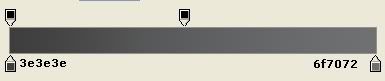
Click on the Gradient Tool using this settings below.

Apply the gradient to the rectangle from top to bottom, make sure the rectangle is selected before applying the gradient. This will give you the effect below.

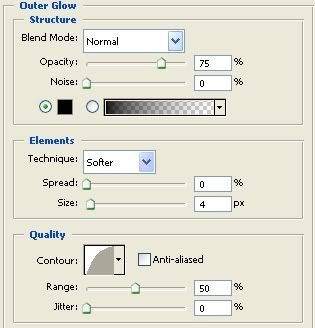
Right click on the rectangle layer and click Blending Options. Now add the Blending Optionssetting below.

Click ok to apply the settings.

4. Creating the Tab buttons.

Create a new layer, Layer > New > Layer… (Shift+Ctrl+N). Using the Rounded Rectangle Tool create a rectangle using the dimensions below. Change the foreground color to #9ad346

With that, you should have the effect below.

This layer should be under the main layer with the navigation bar. Just position it to get the effect below.

Tutorial by Pixel Digest

Written by CrazyLeaf Editorial

Follow us on Twitter @crazyleaf , Facebook , Pinterest

Leave a Reply

Exit mobile version